Skills vs. Workflows: How to Build AI Agents That Are Both Smart and Reliable
A practical framework for separating reusable capabilities from orchestration logic—and knowing when to use each.
Dear readers, this article began with a real problem. I was designing an AI solution for a business scenario that was too complex to solve with a single capability. It required multiple steps, decision points, tool calls, and review gates—which raised a fundamental design question: What belongs in a Skill, and what belongs in a Workflow?
This article is my attempt to answer that question—and to explain how the right division of responsibilities can make AI agents both flexible and reliable.
What’s the Skill vs Workflow best practice?
In AI agent systems, Skills and Workflows operate at different levels of abstraction: Skills are “how to do it” (capability units), while Workflows are “when and in what order to do it” (orchestration logic).
Core Differences[
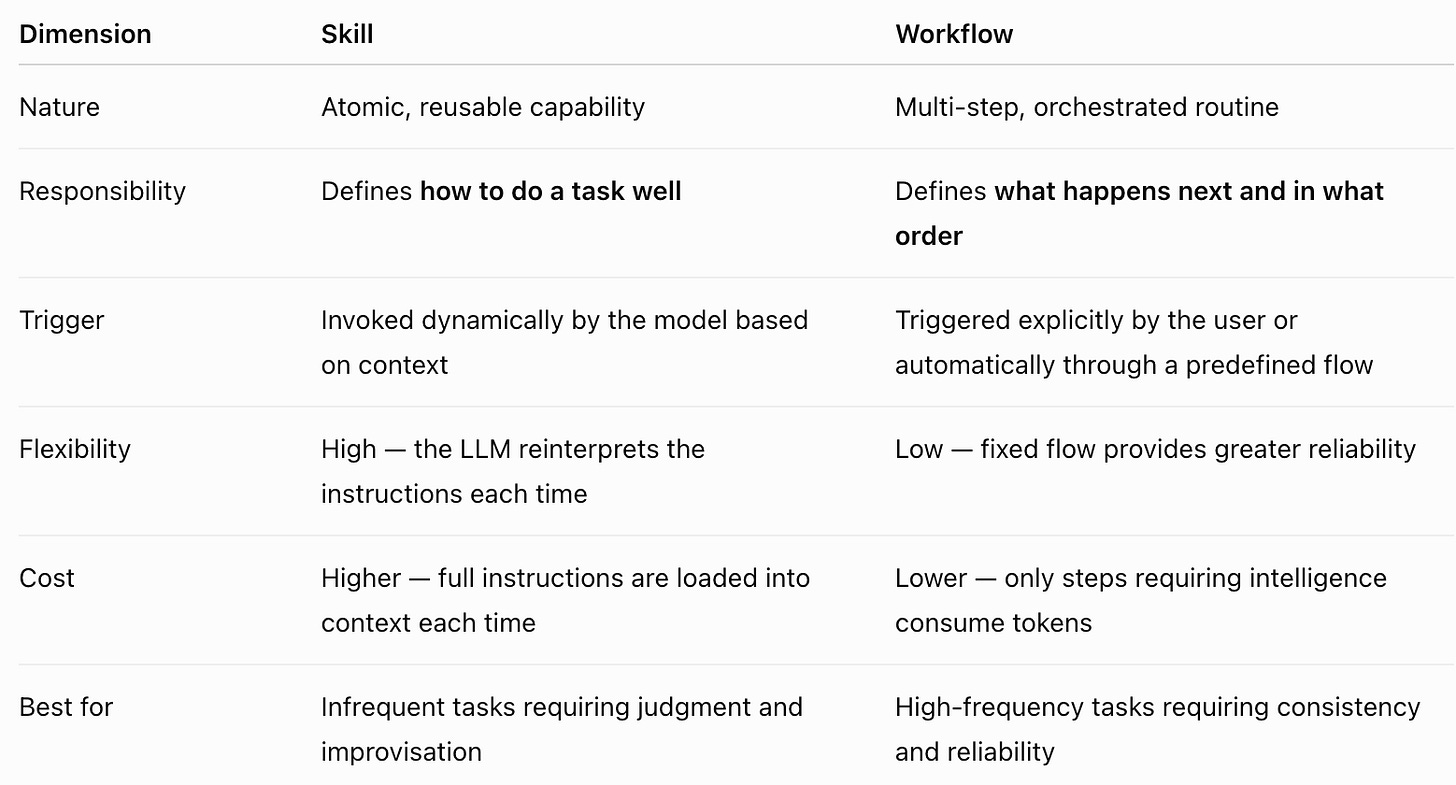
Best Practices
1. Build Skills First, Then Compose Workflows
- Start with your 2–3 most repetitive tasks and write them as standalone
SKILL.mdfiles. - Each Skill should be: reusable, single-responsibility, and testable (5 consecutive runs all meet quality bar).
- Only chain Skills into Workflows once they’re stable.
2. Clear Separation of Concerns
- Workflow handles: state transitions, step sequencing, error handling, human review gates.
- Skill handles: quality standards, templates, checklists, tool-calling logic for specific tasks.
- Keep the contract clean: Workflow asks “when does this happen,” Skill answers “how to do this well.”
3. Design Interfaces First
- Explicitly define each Skill’s input/output schema, preconditions, and failure modes.
- In Workflows, set clear trigger conditions and error branches for every Skill invocation.
4. Version Control and Evaluation
- Treat Skills and Workflows like product code: version them in Git and iterate.
- Maintain an evaluation set (eval set) for each Skill and run regression tests regularly.
- Define retirement paths: archive old Skills when business logic changes.
5. Hybrid Usage Strategy
- High-frequency, standardized tasks (e.g., daily report generation, SEO checks) → Use Workflows for consistency and cost efficiency. linkedin
- Low-frequency, creative tasks (e.g., brand copy drafts, strategy recommendations) → Use Skills to preserve model flexibility. linkedin
- Best practice is a three-layer combo: Agent (reasoning persona) + Skill (execution capability) + Workflow (process reliability).
6. Avoid Common Pitfalls
- ❌ Building Workflows before Skills are stable (amplifies errors).
- ❌ Making Skills multi-purpose (keep single responsibility).
- ❌ Workflows without human review gates (always keep human-in-the-loop).
- ❌ Overlapping functionality between Skills (audit your skill library regularly to avoid redundancy).
Practical Example (Content Marketing Scenario)
Skill 1: `blog_outline.md` — Defines structure, tone rules, and checklists for high-quality outlines
Skill 2: `seo_check.md` — Defines SEO keyword density, meta description, and internal linking standards
Skill 3: `social_format.md` — Defines template formats for Twitter/LinkedIn posts

Workflow: `publish_blog.yaml`
  Step 1: Call blog_outline → generate outline
  Step 2: Human review gate
  Step 3: Call seo_check → optimize keywords
  Step 4: Call social_format → generate social media copy
  Step 5: Publish to CMS + schedule social tools
This layered design lets you iterate quickly on individual capabilities (Skills) while maintaining end-to-end process reliability (Workflows).
Understanding the distinction between Skills and Workflows helped me untangle the complex business problem I was working on. Instead of forcing everything into one oversized capability, I could separate reusable intelligence from repeatable orchestration—and design a system that was easier to build, evaluate, and maintain.
I hope this framework helps you approach your own agent design challenges with greater clarity.
Happy learning, happy building.
Tao
First published on Substack. Original